

Part 1 of our Optimising your Online Customer Journey Series. "Originally posted on our LinkedIn here"
In This Series:
It's a new year, and with that usually comes new plans, new business priorities, and hopefully a few new ways of thinking about how we serve our customers.
If you're like most organizations we speak with, whether in education, government, health and aged care, or enterprise, you've probably felt this frustration: "We have the systems. We have the data. But somehow, the customer experience still feels disconnected."
Sound familiar?
We’d like to introduce you to a simple four-part concept for thinking about online customer journeys: Connect, Understand, Engage, Guide. It's not a methodology you need to "complete", it's a lens for evaluating where you're strong and where you have opportunities. Over the coming weeks, we'll publish deep-dive posts exploring each pillar in detail, but this overview gives you the complete mental model to start with.
If you’re the visual person, you can view this excellent webinar, otherwise let’s dive in.
Optimizing Customer Journeys Across Online Touchpoints Webinar
Let's start with a simple observation: for most organizations, websites are not only marketing assets. They've evolved into research hubs, transaction points, support channels, and collaboration spaces. In many cases, your website is where all your audiences overlap; prospects, customers, partners, and even internal teams.
But here's the tension.
Behind the scenes, organizations operate with multiple systems like CRMs, marketing platforms, e-commerce tools, support portals, data warehouses, which are all optimized for different teams and outcomes. From the customer's perspective, though, there is no "system landscape." There's just the experience.
When those systems don't connect cleanly, friction shows up in real ways. Repeated form submissions asking for information you already have. Irrelevant content that doesn't match where they are in their journey. Poor timing that feels tone-deaf, like sending upsell emails to customers actively struggling with support issues. OR confusing next steps that leave people uncertain about what to do
So the question becomes, how do we design online journeys that feel coherent, personal, and intentional, even when the organization behind them is complex?
Most large organizations don't have a single customer system, they have an ecosystem.
Marketing teams use automation platforms. Sales teams use CRMs or e-commerce platforms. Support teams use ticketing systems and run online forums. Data teams try to pull everything together for reporting. Data moves between these systems, sometimes in real time, sometimes overnight, sometimes manually.
This is where challenges creep in:
The impact isn't just technical. When data quality suffers, organizations lose confidence in their insights. When that happens, teams fall back on assumptions rather than signals. The result? Online journeys that are well-intentioned but poorly aligned with where customers actually are.
To make sense of all this, we've developed a simple four-part model for evaluating and improving online customer experiences: Connect. Understand. Engage. Guide.
It’s a diagnostic lens rather than a linear process. Your organization might excel at one pillar while struggling with another, and that's valuable information. The framework helps you identify where to focus your efforts for maximum impact. Here's the model at a glance:
Connect is about reliably capturing customer behavior and making it available across your organization.
Understand is about turning that behavior into meaningful insights and signals.
Engage is about creating experiences that feel personal and relevant.
Guide is about providing clear paths forward through complex journeys.
Each pillar builds on the previous ones, but you don't need to perfect one before starting another. In fact, most organizations work on multiple pillars simultaneously, just at different depths

In this article, we are going to cover the strategy behind each pillar, what it means, why it matters, and key questions to ask yourself. Then in our deep-dive articles (linked throughout), we'll explore the tactical and operational details, implementation approaches, and real-world examples.
The first pillar is Connect. At its core, this is about reliably capturing what people do on your websites and making that information available to the systems you use throughout the customer lifecycle. Whether that's a CRM, a customer data platform, or a marketing automation platform.
This includes things like form submissions, key interactions, page views, and identifying visitors when they return.
The real challenge isn't just capturing data, it's capturing the right data and making it trustworthy.
Many organizations think they've solved this, but they've often only connected parts of the puzzle. Individual integrations might exist between your website and CRM, or your website and analytics, but are all the dots connected?
Ask yourself: When someone fills in a form on your website, does that create a lead assigned to a salesperson? When the salesperson follows up, can they see what the customer has been researching? Does your website know when a visitor is already a customer versus a prospect? Can support teams see what someone was doing on the website before they called?
Without solid Connect, everything else becomes guesswork. You can't personalize effectively, you can't time engagement well, and you’ll struggle to explain why outcomes happened.
Here are some key questions for you to ask your organization:
→ Connect Deep-Dive (Link) will cover implementation patterns, technology choices, common pitfalls, and a phased roadmap to get started.
Once you've connected the data, the next pillar is Understand. This is where behavior becomes insight.
Instead of asking "Who downloaded this resource?" you can start asking: What patterns are we seeing across different customer segments? What intent signals are emerging from website behavior? Where are people accelerating or stalling in their journey? When is someone ready for the next step?
The shift from aggregate to individual view is crucial. Website analytics are great at telling you what happened across all visitors. But individual customer journeys tell the full story.
Traditional view
50% of visitors drop off at the pricing page
Individual view
Sarah visited the pricing page three times, compared plans, then called sales before converting
CRM systems can show where someone is in a pipeline by assigning them a stage, like qualified, contacted, or closed. But they don't always tell you when someone is ready to move to the next stage. Behavioral signals can help to fill this gap.
Consider monitoring:
This type of knowledge will help give your team timing so they can engage when it's relevant for the customer, not just when it's convenient for your organization.
Here are some key questions for you to ask your organization:
→ Understand Deep-Dive (Link) will cover scoring models, predictive analytics, attribution approaches, and how to identify the signals that actually matter for your business.
With understanding comes the ability to Engage differently.
Engagement here doesn't only mean sending messages or calling the customer, it means shaping the experience people have when they arrive on your website, often called personalization. This might include:
When done well, this doesn't feel "creepy" or over-engineered. It feels helpful.
There’s a need to manage the personalization paradox where people want personalized interactions but avoid sharing their personal data. Majority of people these days are "data pragmatists", that is, they'll share information, but only if the perceived value justifies the risk.
Personalization needs to move beyond being superficial. A website that says "Hi [FirstName]!" is friendly, but it doesn't create meaningful convenience. However, showing content relevant to someone's industry, role, or current situation saves them time, and they'll appreciate that.
The goal is to make people feel understood, not surveilled. When someone sees content that matters to them, they move faster and engage more deeply.
Here are some key questions for you to ask your organization:
→ Engage Deep-Dive (Link) will explore personalization strategies, technology options, privacy considerations, testing approaches, and more examples of what works (and what backfires).
The final pillar is Guide.
Many customer journeys aren't linear, and that's especially true for complex decisions. In a business-to-business sales model or B2B, there are usually multiple stakeholders and decision makers. In a business-to-consumer sales model or B2C, emotional drivers like FOMO (fear of missing out) can influence behavior. Across both, common challenges emerge. Here are examples in a sales or signup process that can hamper your business:
Guiding means creating clarity through clear next steps, shared visibility of progress, and a sense of momentum toward an outcome. It's a shift from "we're pushing people through a funnel" to "we're helping people move forward together."
I went through this myself recently. I was signing up with a vendor for security training for my team. Instead of the usual back-and-forth email chains, you know, “Here's what to do next,” followed by “Did you complete step 3?”, they gave me a online onboarding checklist that tracked my progress.
Every step was laid out clearly: what needed to happen, who was responsible, when it was due, and whether each task was done yet. I could work through it at my own pace. The best part? I could see exactly where we were in the process at any time. No digging through email threads. No wondering if they'd received my documents.
They could see what I had and hadn’t done. I knew what to do next, and if I was stuck, I could easily ask a question.
That's Guide in action.
Here are some practical approaches that you can consider as a starting point.
Here are some key questions for you to ask your organization:
→ Guide Deep-Dive (Link) will cover journey mapping techniques, user experience patterns for complex processes, multi-stakeholder coordination, and measuring whether your guidance is actually working.
Let's recap the framework:
This all results in Better experiences for customers, better outcomes for your organization.
You don't need to tackle everything at once. To help you make this actionable we’ve created a simple-to-use self-assessment rubric.
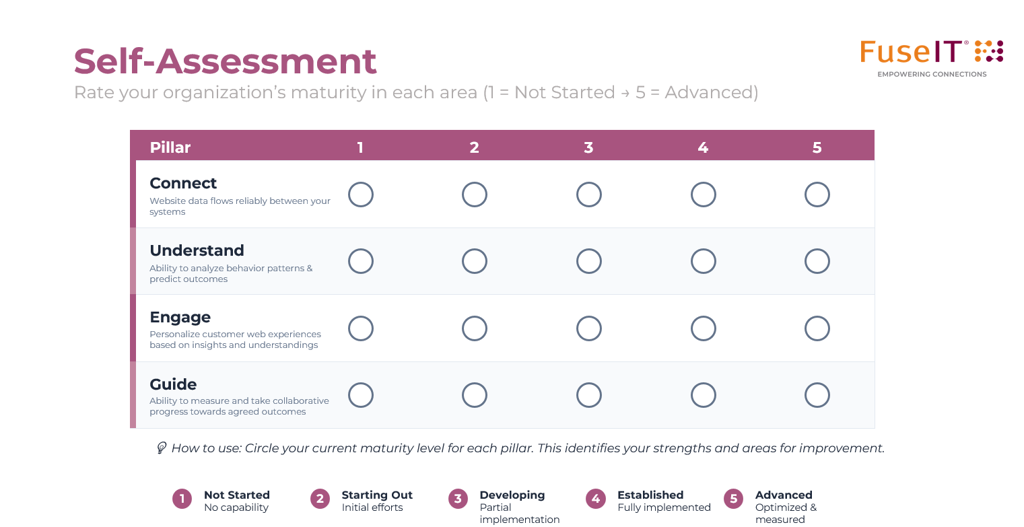
For each pillar, honestly evaluate your current state:
Which pillar, if improved, would have the most impact? That's usually where you should focus first. Sometimes it's obvious, if your data is disconnected, start with Connect. If data is solid but you're not using it, focus on Understand or Engage.
Don't boil the ocean. Pick one specific improvement within your priority pillar and prove its value. Success builds momentum and buy-in for larger initiatives.
This framework isn't prescriptive, it's descriptive. Use it to diagnose, prioritize, and measure progress. Revisit it quarterly to see how you're evolving.
Over the coming weeks, we'll publish detailed deep-dives into each pillar to help you analyze and identify areas for improvement:
Part 2: Connect Deep-Dive (Link) Learn how to build trustworthy data foundations, choose the right integration approach, avoid common pitfalls, and create a phased implementation roadmap. Includes a maturity assessment tool and real implementation examples.
Part 3: Understand Deep-Dive (Link) Explore how to identify meaningful signals, build scoring models that work, implement attribution correctly, and move from reactive to proactive engagement.
Part 4: Engage Deep-Dive (Link) Discover personalization strategies that feel helpful, not creepy, navigate privacy considerations, choose the right technology, and measure what actually drives results.
Part 5: Guide Deep-Dive (Link) Master customer journeys for complex processes, coordinate multi-stakeholder experiences, reduce friction, and design for progress visibility.
We hope this framework gives you a fresh lens for the year ahead. The organizations that excel at customer experience aren't necessarily the ones with the most sophisticated technology, they're the ones that think systematically about how all the pieces fit together.
Want to go deeper?
The conversation doesn't end here. We're learning from organizations tackling these exact challenges, and we'd love to hear about yours.
Has this triggered any questions, and want to keep the conversation flowing? We'd love to talk.



Connecting systems and people since 1992.
A New Zealand–founded global tech company.


By clicking 'Accept all', you agree to the storing of cookies on your device to enhance site navigation, analyze site usage, and assist in our marketing efforts. View our Privacy Policy for more information.
