

This is Part 2 in our series on customer journey optimization. "Originally from our LinkedIn here" If you haven't read Part 1: Rethinking Customer Journeys, start there to understand the full Connect, Understand, Engage, Guide framework.
In This Series:
In our overview post, we introduced Connect as the first pillar of effective customer journey management. We kept it simple: "reliably capturing what people do on your websites and making that information available to the systems you use throughout the customer lifecycle."
Simple in concept. Complex in execution.
Today, we're going deep on Connect. What it really takes to build a trustworthy data foundation, why most organisations struggle with it, and practical approaches to get it right.
Let's start with a scenario you've probably lived through.
Your marketing team runs campaigns that drive traffic to your website. Visitors browse products, download resources, watch videos, and fill out forms. Some convert immediately, most don't. They leave, come back days or weeks later, interact more, and gradually move toward a decision.
Here's the question: What does your system of customer engagement, or CRM, know about all that website activity?
For most organisations, the answer is: not much, or not enough.
Maybe the CRM captures form submissions, the moment someone becomes a "lead" for the sales team. But what about:
All that context, that rich behavioral data showing intent, hesitation, interest, and progression, often lives in analytics platforms that your sales and customer success teams never see.
And that's just one direction of the problem.
Most conversations about website integration focus on getting data from the website into the CRM. That's important, but it's only half the picture.
What about the data flowing the other way?
Does your website know:
Without this flow, you end up with embarrassing disconnects:
True Connect means bidirectional data flow, your website and your customer systems need to inform each other continuously.
Before we get into solutions, let's be clear about what's at stake.
Operational Inefficiency: When your sales team can't see website behavior, they waste time on cold outreach to warm leads and miss hot opportunities. When support teams can't see purchase history or previous interactions, every conversation starts from zero.
Poor Timing: Marketing sends generic nurture campaigns to people who are already deep in evaluation. Sales calls prospects who aren't ready. Success teams miss early warning signs of churn because website activity isn't visible.
Lost Revenue: According to various studies, companies with poor data quality can lose 15-25% of revenue due to operational inefficiencies. That manifests as missed opportunities, poor conversion rates, and customer frustration leading to churn.
Team Friction: When different teams see different versions of reality, trust breaks down. Marketing blames sales for not following up on "hot leads." Sales says the leads weren't qualified. Nobody has the full picture, so decisions become political rather than data-driven.
Customer Frustration: Customers notice when you don't seem to know them. Repeated form fills, irrelevant messaging, and disconnected experiences all signal "this company doesn't have its act together."
The cost isn't just technical, it's strategic.
Let's get concrete. When Connect is working well, here's what you should be able to do:
Ideally you can identify visitors across sessions and devices, matching anonymous browsing behavior to known individuals once they identify themselves (through form submission, login, email click-through, etc…).
In practice: A prospect browses your pricing page anonymously on Monday. On Wednesday, they complete a form or click an email link and land back on your site. You now connect Monday's browsing session to their known identity, giving you complete context.
When you are doing a good job, you’ll be capturing meaningful interactions, not just vanity metrics. This includes:
What this isn't: Tracking every single mouse movement or page scroll. The goal is recording those signals that indicate intent or friction, not surveillance.
Critical behavioral data should flow to your CRM and other systems in real-time or near-real-time, not in overnight batch processes.
Why it matters: If a prospect spends 15 minutes configuring a complex product on your website at 2pm, your sales team should be able to see that context when they have a call scheduled at 3pm.
Website data should merge cleanly with existing CRM records without creating duplicates, conflicts, or orphaned records.
The challenge: Matching website visitors to CRM records requires solid identity resolution, handling scenarios like personal email vs. work email, nickname vs. legal name, and multiple people from the same company.
Your website needs to be able to access relevant CRM data to inform the customer experience, while your CRM needs to receive relevant website data to inform engagement.
For example, the website knows someone is a customer and dynamically adapts navigation to show account management options, and the CRM shows the sales rep that prospect has viewed the competitor comparison page three times this week.
For a bit of context and scene setting we’re now going to recap what we are seeing across the industry today. Most organisations will have one or more of the following approaches to connect their website and CRM systems together.
In this approach, website forms submit directly to CRM, creating leads or contacts.
The advantage of this approach is that it’s simple, reliable, and easy to implement. Unfortunately, it only captures conversion moments and misses all the context before and after, creating data gaps.
This works well for small organisations with simple transactional journeys.
In the second approach, a website analytics platform like Google Analytics, Adobe, etc… is used to track website visitor behavior. Insights are gained when someone runs reports and manually shares them with internal teams.
While this provides rich behavioral data the data isn’t accessible in real time, and requires dedicated resources. Also, insights often don’t reach front-line teams meaning that automated action is difficult to achieve. The data is usually also disjointed from the records in the CRM.
This works best for organisations with dedicated analytics teams and long sales cycles where real-time visibility isn't as critical.
Marketing automation platform like HubSpot, Marketo, or Pardot/Salesforce Marketing Cloud sit between the website and the CRM, tracking behavior and synchronizing data.
These tools are purpose-built for this problem. They include identity resolution and offer good tracking capabilities. The downside is that they can become a bottleneck, and the data model might not match CRM perfectly. Because the data is focused on the marketing team's needs, the other departments may miss out on insights that could help them.
We see this most often in mid-size organisations with active digital marketing programs.
Customer Data Platforms (CDP) like Segment, Tealium, or Salesforce Data Cloud are gaining traction as a central hub for all customer data from multiple sources. CDPs are designed for complex data landscapes and have powerful, if complex, identity resolution rules. They serve multiple systems and provide flexible data routing. They can be used to ingest data from many digital touchpoints and make them available to many systems, including CRMs and data warehouses.
While this all sounds great on paper, there is typically a large implementation effort to adopt a CDP, and they require ongoing maintenance. Most organisations fail to use the full capabilities, and due to their cost, the return on investment can be hard to justify. It’s one more system where context can be lost between websites and customer-facing teams.
Enterprises with multiple customer touchpoints, complex tech stacks, and very mature data teams see the most benefit in using a CDP.
Then there are those that do it alone and have built their own integrations connecting website tracking to CRM with custom business logic. While this is tailored to specific needs, and offers maximum flexibility, it requires development resources. One of the major risks with this approach is that expertise leaves with the developers who built it.
Ideally, this should only be used for organisations with truly unique requirements that off-the-shelf tools can't address. Unfortunately, this isn’t always the case and it’s used more often than you might expect.
There is now a shift in the industry to move towards solutions that offer a direct website-to-CRM connection that solves issues such as identity resolution and sharing data across the organisation for all the different departments without dedicated data teams or the expense of a CDP. These CRM native experiences offer both simplicity and power. FuseIT operates in this space, and we’d love to talk to you about how our solutions can power your website connections.
We’ve now covered the most common approaches that are used worldwide. They all have their own pros and cons. Regardless of which technical approach you choose, here's a framework for thinking through your Connect strategy:
Start by documenting what you have:
Exercise: Draw a simple diagram with boxes for each system and arrows showing data flows. You'll quickly see where connections are missing.
Not all data is equally important. Let’s identify what absolutely needs to flow:
From website to customer systems:
From customer systems to website:
Before you connect systems, agree on what "good data" means. You will need identity resolution rules, data hygiene practices, and data governance. We’ve compiled some questions for you to answer.
Exercise: Go through these questions with your peers.
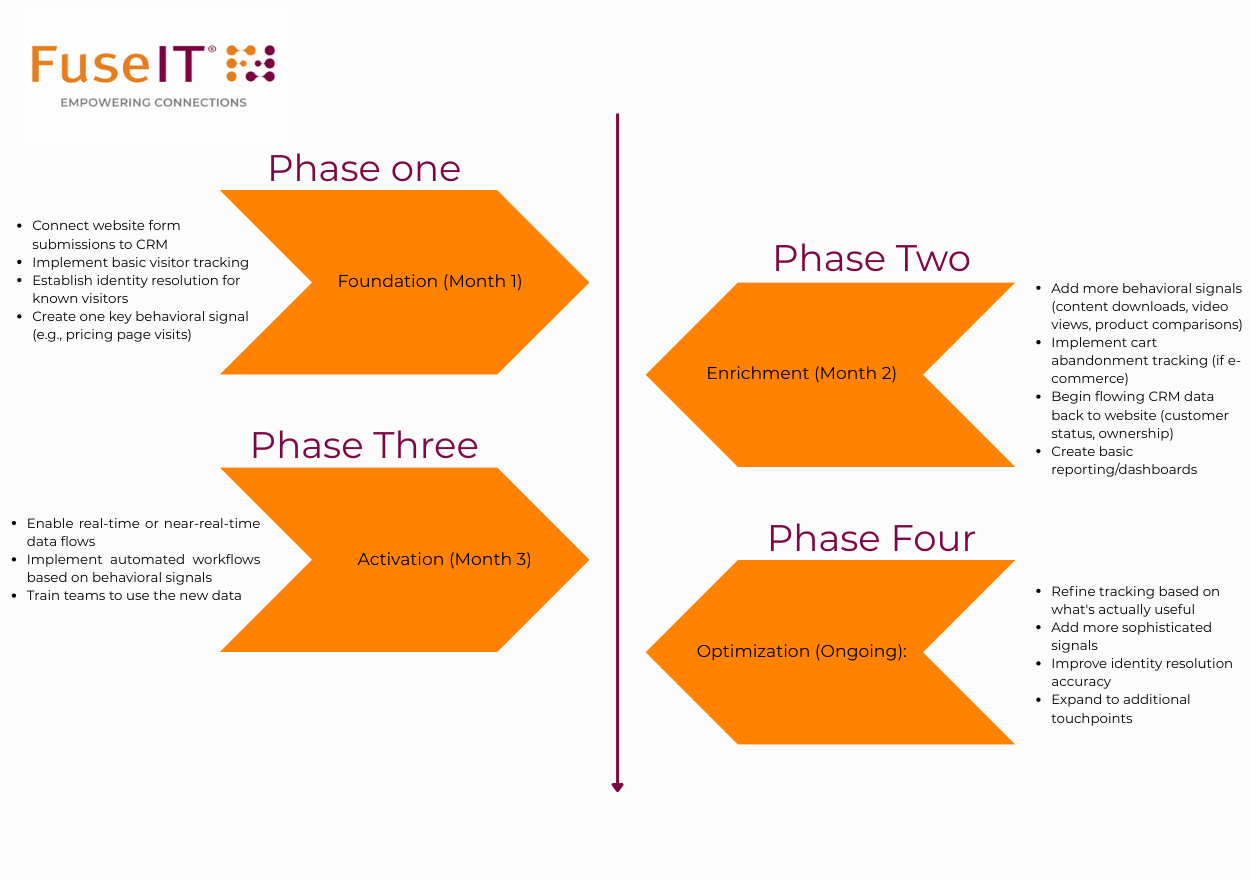
Based on your landscape, needs, and resources, select an approach, or combination of approaches (see patterns above). Consider what your organizational data maturity is, how many systems need to share data, and how complex your customer journeys are.
Don't try to connect everything at once.
I like to think of these as traps or anti-patterns that you should try to avoid.
Pitfall 1 - Tracking Everything: More data doesn't mean better data. Tracking every click creates noise and overwhelms teams.
Solution: Start with 5-10 meaningful signals that indicate intent or friction. You can always add more later.
Pitfall 2 - Ignoring Data Quality: Connecting systems with dirty data just spreads the mess faster.
Solution: While CRM data will never be perfect, attempt a “spring clean” of your CRM before connecting it to website tracking. Establish validation rules. Monitor for duplicates and anomalies.
Pitfall 3 - Technical Implementation Without Business Context: IT implements tracking without understanding what business questions need to be answered.
Solution: Start with use cases. "We need to know X so we can do Y." Let that drive what you track and how you structure data.
Pitfall 4 - Set It and Forget It: Integrations break. Websites change. Tracking degrades over time.
Solution: Establish monitoring and regular audits. Test tracking quarterly. Review what's actually being used and what's just creating noise.
Pitfall 5 - Privacy Afterthought: GDPR, CCPA, and other regulations make careless tracking risky.
Solution: Build privacy into your design from day one. Get legal/compliance input early. Be transparent with customers about what you're tracking and why. Implement proper consent mechanisms, especially in jurisdictions requiring explicit opt-in. Collect the minimum data necessary for your purposes.
Pitfall 6 - Siloed Implementation: Marketing implements tracking that only they can see and use.
Solution: Include sales, support, and product teams in requirements gathering. Ensure data is accessible where teams actually work.
Connect isn't the most exciting part of customer journey optimization. It's plumbing. Infrastructure. Foundation work.
But here's the truth: without solid Connect, everything else falls apart.
You can't Understand customer behavior if you're not capturing it reliably. You can't Engage meaningfully if different teams see different realities. You can't Guide effectively if your systems don't know where people are in their journey.
Get Connect right, and you unlock everything else.
The good news? You don't need to be perfect. You need to be intentional, disciplined, and committed to continuous improvement.
Start small. Prove value. Expand systematically.
Your future self, and your customers, will thank you.
Coming Next: In Part 3, we'll dive deep into Understand: how to turn all that behavioral data into actionable insights, build models that actually work, and develop the signals that predict customer intent.
Questions? Connect with us on LinkedIn or schedule a conversation to discuss your specific Connect challenges.
Has this triggered any questions, and want to keep the conversation flowing? We'd love to talk.




Connecting systems and people since 1992.
A New Zealand–founded global tech company.


By clicking 'Accept all', you agree to the storing of cookies on your device to enhance site navigation, analyze site usage, and assist in our marketing efforts. View our Privacy Policy for more information.
