

The FuseIT Downloader will install and run but will not download files without a license. This allows you to confirm your environment and suitability. The installer has a client and a service. The in-app licensing has two tiers:
Allows one user running a unified instance to connect up and do as many downloads and orgs and sites as needed. In this situation, install the client and service together (default). Example usage: You are a developer or an admin running everything off your desktop.
Service runs on one machine, client on another, multiple user. Example usage: Several team members could be connecting to a central download server in the cloud.
The client runs on Desktop OS Windows 10 20H2 or newer. The service component runs on a range of Windows Desktop or Server OS.
The Microsoft Defender SmartScreen will likely pop up during the installation with the following message:
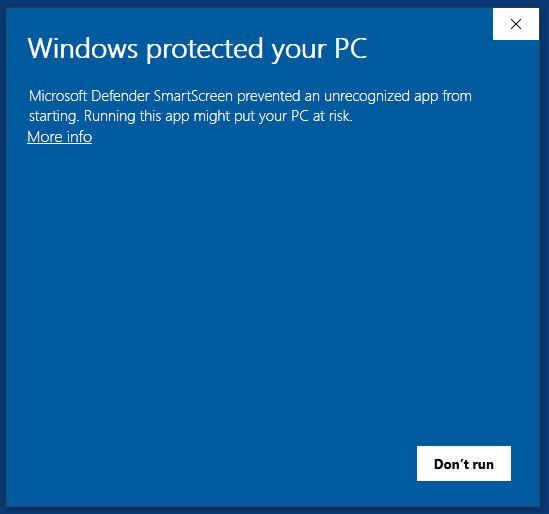
Click the More info link in the window. The following window will pop up:
Click the Run anyway button to start the installation.
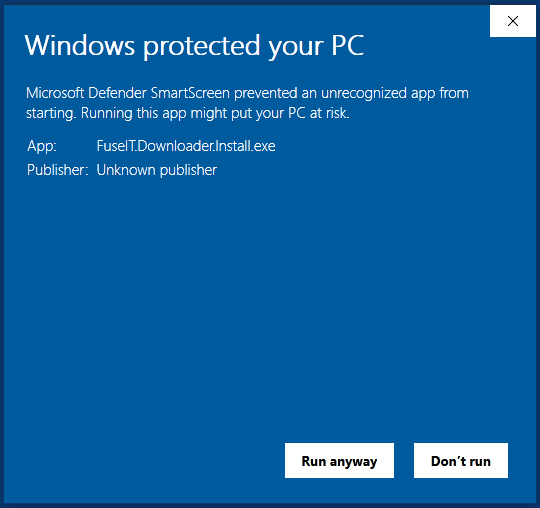
Filename: FuseIT.Downloader.Install.exe
MD5 Integrity Check: FuseIT.Downloader.Install.MD5Sum.txt
We’re here to help.
Visit our support page for more documentation or get in touch with us at support@fuseit.com.


Connecting systems and people since 1992.
A New Zealand–founded global tech company.


By clicking 'Accept all', you agree to the storing of cookies on your device to enhance site navigation, analyze site usage, and assist in our marketing efforts. View our Privacy Policy for more information.
